The Loxone Miniserver is the central component of every Loxone smart home — but most marketing material talks about features (lighting scenes, energy management, mobile control) without explaining what the Miniserver actually is or how it works.
This guide is for customers who want to understand the hardware before they sign a £20,000 install quote. It covers what the Miniserver is, what it does, what it doesn’t do, and why it matters that it runs locally instead of in a manufacturer’s cloud.
What the Miniserver actually is
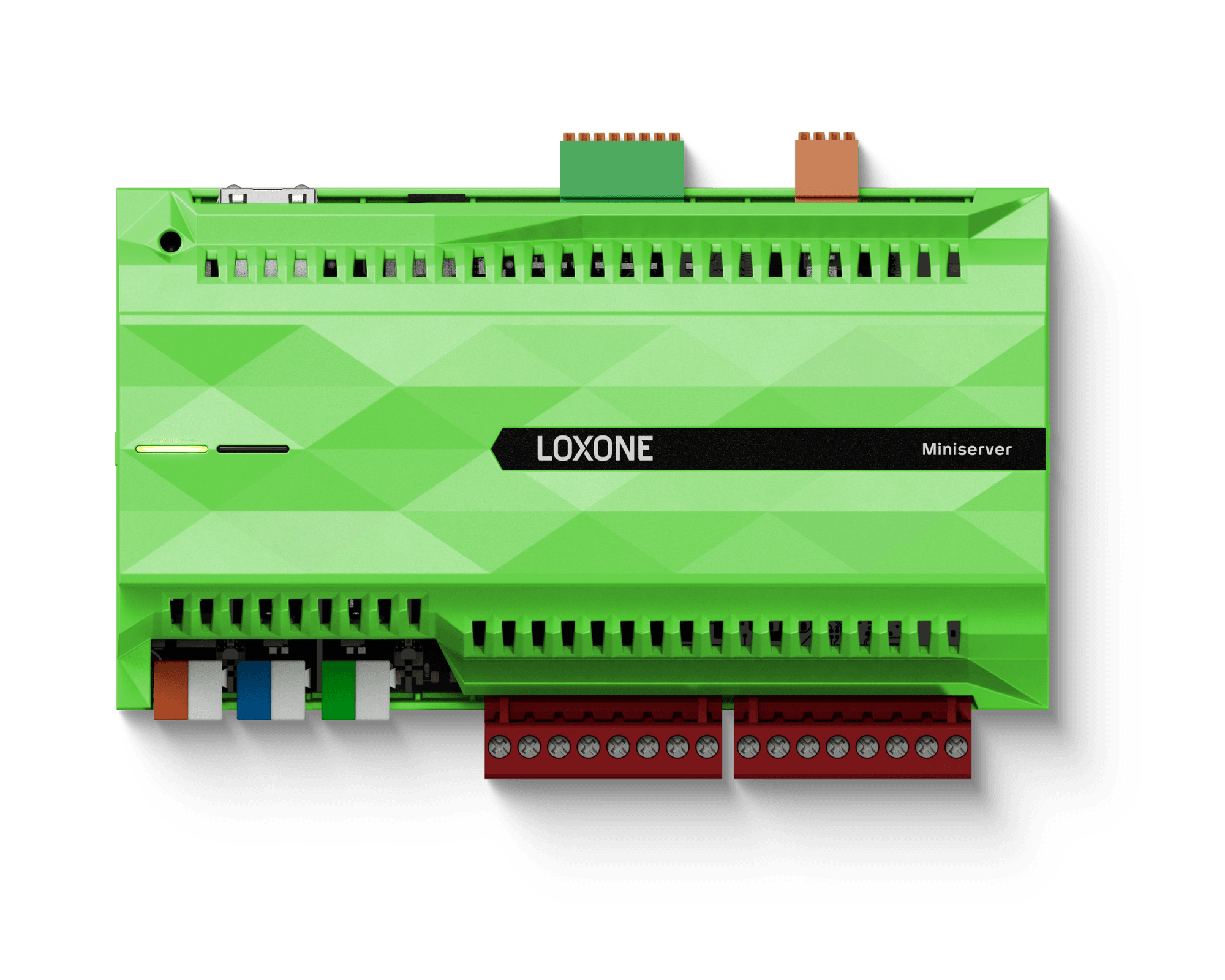
The Loxone Miniserver Gen2 is a small DIN-rail-mounted controller — roughly the size of two stacked smartphones — that sits in your electrical distribution board alongside the consumer unit. It runs a real-time embedded Linux operating system and a Loxone-specific control engine.
Physically it has:
- Ethernet port for network connection.
- Power input (24V DC, low-voltage).
- Tree and Air interfaces for connecting Loxone wired and wireless devices.
- Inputs/outputs for direct connection of basic switches and relays.
- An SD card slot for backup and configuration storage.
That’s it. No screen, no buttons, no fan. It sits silently in your distribution board and runs the house.
What it does
The Miniserver is the brain. Every sensor in the house (motion, temperature, contact, light, presence) reports to it. Every actuator in the house (lighting dimmers, heating valves, blind motors, audio outputs) is controlled by it.
When a motion sensor in the kitchen triggers at 7am, the Miniserver decides — in milliseconds, locally — whether to turn the lights on. That decision considers:
- Time of day (above the schedule threshold?)
- Ambient light level (is daylight already enough?)
- Presence (are you actually home or is this a fault?)
- Scene state (is “Sleep” still active?)
- User overrides (have you manually turned the kitchen lights off?)
The decision logic is written once in Loxone Config (the configuration software) and runs continuously thereafter. It doesn’t need to ask any cloud service for permission. It doesn’t pause if your broadband drops. It doesn’t slow down if Loxone’s servers are busy.
What “local-first” really means
Cloud-dependent smart-home kit (Hive, Nest, Hue, Tado) sends every command through a manufacturer’s server. When you tap a Hive thermostat in your kitchen, the request goes:
Kitchen → Router → Internet → Hive cloud → Internet → Router → Thermostat
That round-trip typically takes 200–800ms in good conditions, longer on flaky broadband, and fails entirely when the manufacturer’s cloud has an outage (which has happened to all major cloud-based smart-home brands in the last five years).
The Loxone Miniserver bypasses all of that. When you tap a wall panel in your kitchen, the request goes:
Wall panel → Miniserver → Lighting extension → Light
Total latency is typically under 50ms and the system never depends on any third party’s uptime. Your house keeps working with no internet at all.
This is the single biggest practical difference between Loxone and most consumer smart-home kit, and it’s why rural UK customers — Derbyshire Dales, Lincolnshire fens, parts of the Peak District — overwhelmingly choose Loxone over Hive or Tado.
How it’s programmed
The Miniserver is configured in Loxone Config, a free Windows application used by every Loxone installer in Europe. The configuration is a visual block-diagram (similar to function-block programming) that defines every behaviour in the house.
Examples of typical Loxone Config logic blocks:
- “If kitchen motion AND ambient light < 100 lux AND time between 06:00–23:00, set kitchen lights to scene ‘Active’.”
- “If solar generation > 2kW AND hot water cylinder < 60°C, switch immersion heater on.”
- “If front door NFC reader = Jack, run scene ‘Arriving Home’.”
The configuration file lives on the Miniserver itself and is backed up to an SD card. Any Loxone Partner anywhere in Europe can open the file and modify the system — which is why Loxone installations are not dealer-locked the way Control4 systems often are.
Extensions — how the Miniserver controls things
The Miniserver doesn’t directly control lights or speakers. It works through extensions — DIN-rail modules that handle specific subsystems:
| Extension | What it does |
|---|---|
| Tree Dimmer / Relay | Lighting and switched outputs |
| RGBW Dimmer | Colour-changing scene lighting |
| Audioserver | Multiroom Audio across the house |
| HVAC Tree Extension | Per-room heating and cooling |
| Energy Manager | Solar, battery and EV coordination |
| Blind Extension | Electric blinds and curtains |
| NFC Code Touch | Keyless entry on doors |
| 1-Wire Extension | Temperature sensors and legacy hardware |
A typical 3–4 bed install uses 5–8 extensions alongside the Miniserver. All of them are configured in the same Loxone Config software and report to the same Miniserver.
What the Miniserver doesn’t do
To be honest about its limits:
- It’s not a security camera DVR. Loxone can integrate with CCTV and trigger events from cameras, but the cameras themselves are typically a third-party brand (Hikvision, Axis) with their own recording.
- It’s not a wireless mesh router. It uses standard Ethernet and a separate Loxone wireless protocol (Air); it doesn’t replace your home Wi-Fi.
- It’s not a voice assistant by itself. It integrates with Alexa and Google Assistant for voice control, but the speech recognition runs on those platforms.
- It’s not designed for industrial PLC use. There’s a Loxone industrial product line, but the residential Miniserver targets homes up to large estates.
Why one Miniserver is usually enough
Customers often ask whether they need multiple Miniservers for a large house. The answer is usually no — a single Miniserver with the right extensions handles up to a 7-bed detached property comfortably. Very large estates (8+ bed, multiple buildings, separate annexes) sometimes use a primary Miniserver with one or more Miniserver Compact units in outbuildings, but this is the exception not the rule.
Garden rooms and outbuildings can either share the main house Miniserver (preferred where cabling allows) or have their own Miniserver Compact for full autonomy.
How to get a Loxone Miniserver installed
Westgate is a Loxone Silver Partner covering the East Midlands — Nottingham, Derby, Sheffield, Mansfield, Lincoln, Chesterfield and surrounding postcodes. Every install is delivered by Loxone-trained Westgate engineers (no sub-contracting), at a fixed quote, with no monthly subscription.
See whole-house automation → · See garden room packages → · Book a free site visit →
For deeper reading, see our guides on smart home energy saving → and Loxone vs Control4 →.
Jack Jones
Director, Westgate Property Solutions · Loxone Silver Partner